Showing posts with label photography. Show all posts

Saturday, August 09, 2014

The Kelpies - B&W PRINT SET OFFER


Here is an opportunity to purchase a unique set of 4 high quality, black & white fine art prints of "The Kelpies" located in Falkirk, Scotland. These images are printed in MetalPrint high gloss or MetalPrint satin finish and are sized at 16" x 24" or 24" x 36". This set of 4 high quality prints have been priced as a special package (25% - 30% discount on normal price) and would make an exceptional framed series for the collector.

To purchase go to http://www.highlanderimages.com/Gallery/The-Kelpies/ then click the BUY PHOTOS button then choose BUY PHOTO PACKAGE to take advantage of this special package pricing.

To create MetalPrints we infuse dyes directly into specially coated aluminum sheets, creating truly archival works of art. These MetalPrints showcase a revolutionary new medium that is highly durable, waterproof, weatherproof, and ultra scratch-resistant. The unique printing method gives your photos a vibrant luminescence with incredible detail and resolution.

Choose from High Gloss and Satin finishes.

Each print has rounded corners for your safety and the surface can be easily cleaned with any commercial glass cleaner.

MetalPrints come ready-to-hang with two 3/4" thick lightweight foam blocks and aluminum plate with pre-drilled holes. MetalPrints sized 30x40" and up are backed with an inset frame for added stability.

When hung, these stunning prints will float off the wall.

Don't miss this opportunity to create an archival piece of art for your wall at home or in the office.


Sunday, April 07, 2013

Spotlight - By Behind The Lens

Peter Tan who has successfully been running his live interview series, called Behind The Lens, for almost one year now approached me with the idea of doing an online interview session. This would hopefully cater to a larger audience and particularly those people who could not make the live sessions held in Kuala Lumpur.

Here are the complete set of video interviews recorded covering my focus on landscape and travel photography.


EP1 - Introduction


EP1 - Portfolio


EP1 - Nepal Trek


EP1 - On Location


EP1 - Back from Nepal


EP1 - What's In My Bag?


Sunday, May 06, 2012

Tyler Stableford - Adventure Photographer


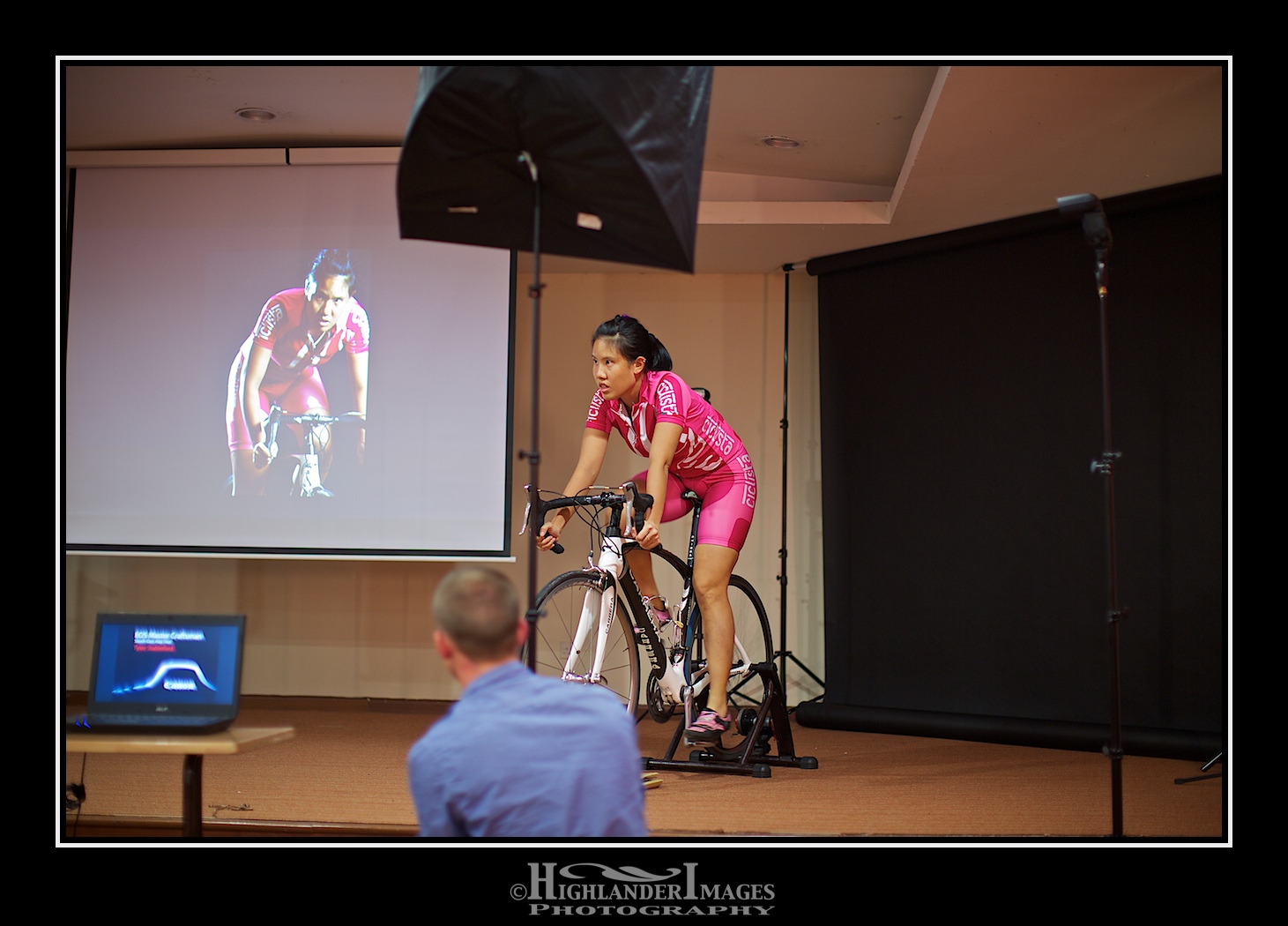
Tyler Stableford was in Malaysia today to present a seminar as part of the Canon's EOS Master Craftsmen Southeast Asia Tour 2012. His presentation was very inspiring and showed Tyler's skills in both photography and cinema-photography in a number of adventurous situations. Much of this recent work was shot with the new Canon EOS 1D X and 5D Mk III cameras and used the latest wireless Speedlight 600 EX-RT flash units with the ST-E3-RT transmitter. These situations also displayed the durability and ruggedness of the Canon equipment which was used in some severe weather situations and arduous environments. As well as displaying his work he presented a live shooting demo with one of Malaysia's national cycle team highlighting his approach to making a shoot and using an array of Canon Speedlight 600 EX-RT flash units to enhance the lighting of the shot.


About Tyler Stableford

Aspen photographer and director Tyler Stableford has earned an international clientele for his commercial and editorial work. His clients include Disney, Patagonia, Stetson and The New York Times, among others.


Men's Journal named Tyler one of the seven "World's Greatest Adventure Photographers". He is one of Canon's distinguished Explorers of Light, as well an ambassador for the SanDisk Extreme Team and Adobe's digital imaging software.


Tyler's work has won numerous awards from Communication Arts, Photo District News, American Photography, the International Photography Awards, National Geographic Traveler, and more. His short film "The Fall Line" won the Official Best of Fest competition for "Award-Winning Films To Inspire."

Tyler is a graduate of Dartmouth College. His passion for photography extends beyond commercial work: He volunteers to shoot at least one week per year for nonprofits, and is an active member of the environmental-business organization "1% For The Planet".


You can check out his work at www.tylerstableford.com


Saturday, August 27, 2011

The Angkor Photography Festival


I attended the Angkor Photography Festival in 2007. This event is held every year in Siem Reap, Cambodia and attracts hundreds of photographers worldwide to an exciting exhibition of a wide range of photography genres. If you look very closely at this photo of a poster advertising the event you can see my name. 

There are normally many workshops arranged to coincide with the festival and you can get the opportunity to perhaps attend one given by some well known photographers. I attended one arranged by the VII Agency run by Gary Knight and Philip Blenkinsop.

Monday, May 30, 2011

First Timelapse

Having been persuaded by my wife to assist her in her efforts at her charity group jumble sale event I had to find something to keep my interest up so I decided to use the opportunity to explore the technique of time-lapse photography. I had recently bought a remote control device (Promote Control) to connect to my camera primarily to have better control of my HDR bracketing but it also provided a great intervalometer which provided an ideal setup for time-lapse.

So armed with my 5D, tripod, some fresh batteries, large capacity CF cards and the Promote Control unit I set up at the jumble sale to try and capture the event and condense all the action into a video of 1-2 minutes.

Here is a brief checklist of the setup I did for the time-lapse:

1. Setup 5D on firm and stable tripod
2. Frame the scene as required for the final image needed (I used a 50mm and 16-35mm lenses for 2 separate time-lapses)
3. Ensure a new fresh battery in camera
4. Have a large capacity CF card in camera
5. Setup image capture to high resolution jpeg to allow for large number of images to be captured on the CF card. You can alternatively capture RAW if you want to do some digital zooming in post-processing
6. Focus camera and then turn to manual focus to prevent camera trying to refocus every frame
7. Adjust white balance from auto to manual
8. Take some sample shots to ensure exposure is set correctly and adjust as necessary.
9. Set exposure to manual and set aperture to large value (f/16) to ensure depth of field and shutter speed to approximately half the interval time, in this case shutter speed was around 0.5 secs. This gives a nice blur effect in the video replay and does not result in jaggy movement. ISO was set at 100.
10. Given the activity of the scene I wanted to take images every 2 secs so I set the Promote Control to take images every 2 secs and also set mirror lockup to improve image quality. I set no of images to infinite so I could manually stop after a period of about 20-30 mins. If you are going to be replaying the video at 24 fps and you are taking images every 2 secs then you must consider that you will need to record images over a time of 48 minutes to get a final video time of 1 minute.
11.  I captured two sets of time-lapse images, one set with my 50mm lens (559 RAW images) and one set using my 16-35mm lens (926 high res jpg). So I had a total of 1485 images for the final time-lapse.
12. Once settings are confirmed it's a simple matter of pressing Start on the promote Control and then stand around with your Starbucks coffee looking cool while the camera goes to work.
13. All the captured images on the CF cards were then transferred to Aperture for some basic post-processing. The beauty of Aperture is that you can set up any required edits for one image (e.g. cropping, enhancement, exposure, sharpening, etc) then lift and stamp onto all the images in the sequence.
14. I cropped all the images to video HD size of 1920 x 1080
15. I did some minor adjustment on exposure using the recovery slider
16. I added a minor enhancement to vibrancy
17. I then exported all the images to a folder for upload into QuickTime 7 Pro
18. Load the image sequence into QuickTime 7 Pro
19. Choose a frame rate replay of 15fps. I experimented with 24fps and also slower frame rates but the 15fps seem to fit the scene and the action going on. This also gave me a reasonable final video run time of around 1.5 mins.
20. I then exported the final video as a 720p sized video
21. Import video into iMovie and add titles, music as appropriate.
22. Upload to your favourite website, blog or YouTube

And here is the final product ....... not bad I thought for a first trial.

Saturday, February 12, 2011

10 Annoying Habits of Photographers

Now of course I don't do any of these bad habits but if you read this and find that perhaps there are one of these bad habits (or even a number of these bad habits) that you are guilty of just take note and remember ..... WE ARE WATCHING YOU! 

By the way bonus points if you can guess who the person is in the first photo.


No. 1 Lens Cap On  - Carrying your camera with lens cap on. 
You need to be ready to grab that next picture and you need to be able to react quickly. That extra few seconds you need to get the lens cap off is probably more than enough time for you to miss the shot. The only time your lens cap should be on is when your camera is packed away in your camera bag. Worried about scratching or damaging your lens? - get a lens filter which offers protection and is cheap to replace if damaged.


o -------- o

No. 2 Lens Hood Reversed - Shooting with lens hood on camera in reversed position. 
If you are going to use a lens hood ... then use it. Otherwise throw the piece of plastic away. It does nothing in the reversed position on the lens .... and looks very un-cool.

o -------- o

No. 3 Unnecessary Flash - Using flash taking a picture through a window 
Think about what the flash is doing. If there is a window in front of the flash then all that is going to happen is an extreme back scattering of light rendering your picture into a mass of light reflections.

o -------- o

No. 4 Beep - Having that annoying 'beep' function switched on when focusing. 
I rank this on the annoyance scale just below those annoying squeaky shoes that some parents seem to insist their toddlers wear.

o -------- o

No. 5 Airport Photos - Taking photos of friends in airport terminal
This is usually executed with some bland, grey airport background which could be any airport in the world. Honestly if you are going to take a photo of friends in the dream holiday location you have just arrived at please find a more interesting background than an airport wall. Airports are no longer enjoyable and are places to move through as quickly as possible, so forget the photos.

o -------- o

No. 6 The Two Fingered Salute - Getting subjects to pose with two fingers raised in the peace sign. 
This seems to be an unfortunate trait of Malaysians posing for photos. Learn to use the two fingers in the appropriate situation like when driving along Old Klang Road and signaling to the guy who has just cut you up from the outside lane.

o -------- o

No. 7 Lens Changing  - Changing lenses with no regard to outside dust getting into camera. 
Keep it clean. Your camera may be equipped with the latest sensor cleaning technology but do try and minimise the amount of dust, dirt and grunge that can enter your camera body when changing lenses. When changing lenses point your camera downwards to minimise dust entry. This may save you hours of post-processing and cloning out all the dust specks or worse still an expensive sensor replacement.

o -------- o

No. 8 Countdown - Counting down "1-2-3" before taking picture. 
This only assures you of getting a picture with all of your subjects straining to pose with a fake, plastic smile. A guaranteed method to capture a bad shot. Get your subjects to relax, talk to them, crack some jokes and take the shot when you identify that special moment or even better take numerous shots to ensure you get one keeper.

o -------- o

No. 9 Flash Fail - Not being able to get built-in camera flash to operate. 
So many times I'm sure you have seen this particular camera man trying numerous times to take his shot with his flash failing to fire. He fumbles with his camera, ask his subjects to pose again and then the whole cycle continues. The camera man appears to randomly press buttons on the camera in the hope that he will get lucky. Learn how to use your flash and know where all the operation buttons are on your camera so you can do this in the dark without looking.

o -------- o

No 10. Mega Posting 
Posting massive posts of images on Facebook or Flickr
This usually includes posting of every single image shot including all the badly composed and out-of-focus shots. Do some basic editing and screen out all the bad shots keeping your posted images to the point and without multiple repetitions of your girlfriend in 20 or 30 different poses. Yes we know she's a looker but after scrolling through 20 images of her boredom will set in.

o -------- o


Monday, October 25, 2010

One Asia - Celebrating The Images of Asia

Michael Yamashita inspired all the attendees at the One Asia "Images of Asia" Conference at Suntec in Singapore 23rd - 24th October with his wonderful stories of his 30 year career in photography. Michael is a renowned National Geographic photographer who has specialised in many Asian based stories. In two sessions he highlighted many of these stories and material from his books with some wonderful photographs and illuminated the background involved in the picture planning and setup.
Steve McCurry was meant to have also been at the event but unfortunately cancelled at the last moment leaving Michael to take the main headline spot.
Other photographers presenting included James Whitlow Delano, Manuel Librodo, Goh Kim Hui, Lester Ledesma, Gunther Deichmann, Michael Aw, William Tan, Evan Wong, Francis Lee, Yeo Wee han, Diego Garcia, Jeffrey Kong, Ralph Haering, Felix Goh, Nelson John, Andy Yeo and Aaron Wong. The event was organised by Asian Geographic magazine.
James Whitlow Delano

Andy Yeo, Asian Geographic PASSPORT Expeditions

Lunita Mendoza, Asian Geographic Editor

Customised Canon with bling!

Celebrity Photographers

Photo Competition Judging

Photo Competition Exhibition

 Adobe stand with attractive software offers

Canon IPF 8300 demo

 One Asia Registration Desk

Photo Competition Exhibition

Photo Competition Exhibition


 Michael Yamashita in action

Saturday, September 26, 2009

Best of The Best - Alltop Photography


HighlanderImages blog is now listed at Alltop site .... check this site out for some great photography web links and other many topics.

Alltop, all the top stories